Ansible Terminal User Interface
Every ansible-* command.
One guided interface. Zero context switching.
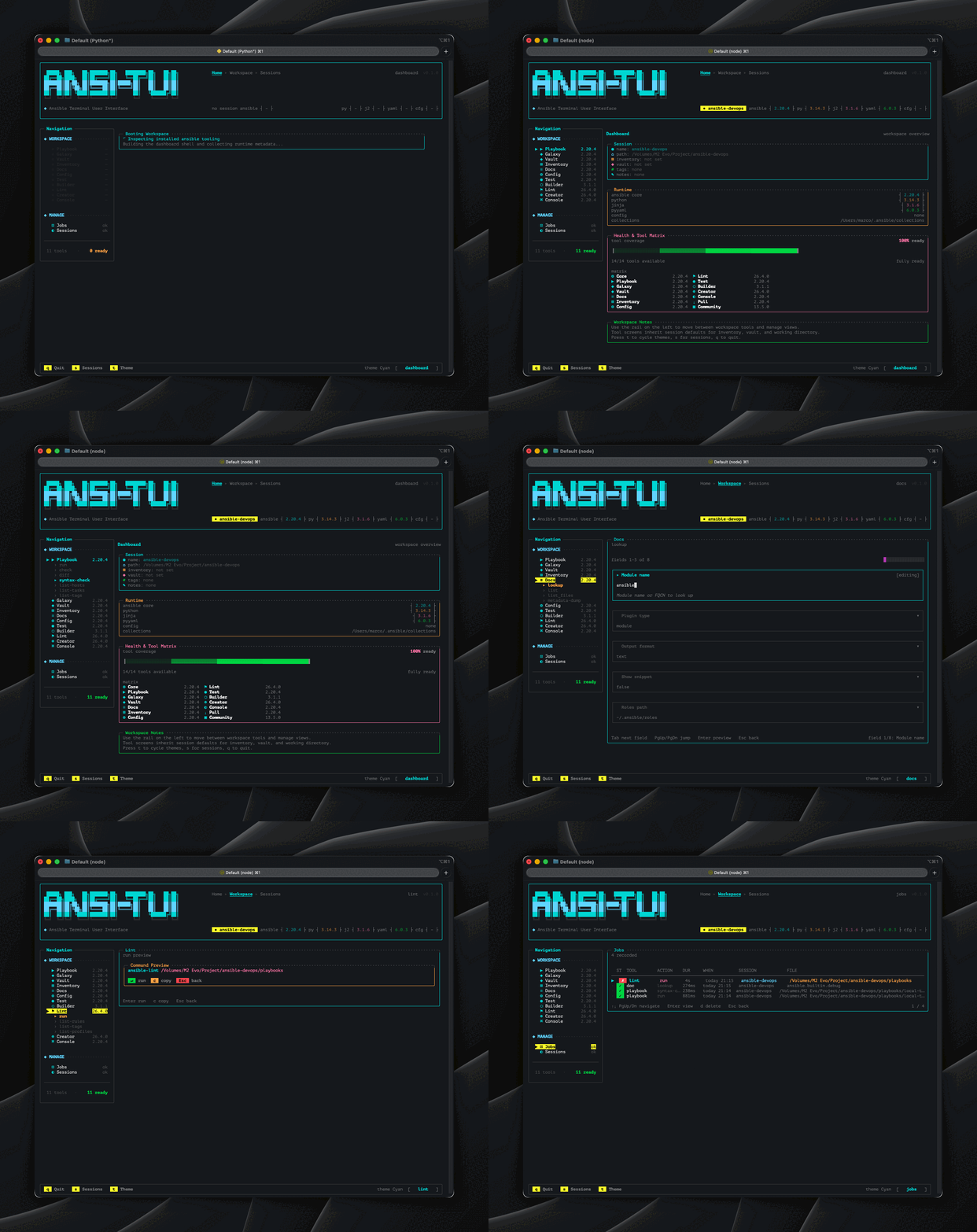
Select an action, fill a form, preview the exact command, then execute with live output streaming, session context, job history, and 8 themes included.
Why ansi-tui?
Everything you need to run Ansible confidently without leaving your terminal or opening a flag reference.
11 interactive tools
Full coverage of ansible-playbook, ansible-galaxy, ansible-vault, ansible-inventory, ansible-doc, ansible-config, ansible-lint, ansible-builder, ansible-creator, ansible-test, and ansible-console.
4-phase guided workflow
Select action, fill the form, preview the command, then execute. The same workflow every time, on every tool.
Session persistence
Named workspaces with inventory, vault, proxy, tags, environment variables, and notes pre-filled per project or customer.
Live execution output
Streaming ANSI-aware output with pause and resume, elapsed time, scroll controls, and a full output log recorded per job.
8 color themes
Cyan, Blue, White, Gray, Yellow, Violet, Red, and Neon. Press t to cycle through them live in the terminal.
Enterprise-ready
Proxy-aware, offline-installable, no Docker required, and designed to run cleanly on jump hosts and shared systems.
297 tests
Unit, component, screen, hook, and integration coverage with CI running on Node.js 20, 22, and 24.
Keyboard-first
Every action is reachable without a mouse, including navigation, forms, output scrolling, and the built-in path picker.
Local-first and safe
Stored locally with masked password fields, explicit command preview, and array-mode execution to avoid shell-quoting risks.
One workflow for every Ansible command
Every tool follows the same four-phase workflow. No docs needed. No flag memorisation.
Action Select
Pick the Ansible tool and action you want to run from a guided sidebar.
Grouped sidebar by tool, then expand and choose the action
Parameter Form
Fill the form with path browsing, session defaults, and validation before execution.
Auto-filled from active session and Ctrl+F opens the picker
Command Preview
Inspect the exact argv and flags before anything runs so there are no surprises.
Exact command preview with validation state before run
Execute
Stream live output with ANSI rendering, scrolling, pause and resume, and automatic job logging.
Real execution, live output, and durable history records
Action Select
Pick the Ansible tool and action you want to run from a guided sidebar.
Grouped sidebar by tool, then expand and choose the action
Parameter Form
Fill the form with path browsing, session defaults, and validation before execution.
Auto-filled from active session and Ctrl+F opens the picker
Command Preview
Inspect the exact argv and flags before anything runs so there are no surprises.
Exact command preview with validation state before run
Execute
Stream live output with ANSI rendering, scrolling, pause and resume, and automatic job logging.
Real execution, live output, and durable history records
Every ansible-* command.
All in one place.
11 first-class interactive tools · 60+ supported actions
| Tool | Actions | Count | Highlights |
|---|---|---|---|
| ▶ ansible-playbook | runcheckdiffsyntax-checklist-hosts +2 more | 7 | Run playbooks with check and diff mode, tag filtering, and vault support. |
| ◈ ansible-galaxy | role installrole initrole listrole removerole info +12 more | 17 | Full role and collection lifecycle: install, build, publish, verify, and search. |
| ◆ ansible-vault | createencryptdecryptviewedit +2 more | 7 | Full vault lifecycle with vault ID and password file support. |
| ⊞ ansible-inventory | list (JSON/YAML/TOML)host varsgraph tree | 3 | List inventory, inspect host vars, and render graph trees in multiple formats. |
| ≡ ansible-doc | module/plugin lookuplistlist_filesmetadata-dump | 4 | Module and plugin documentation lookup with metadata dumping. |
| ⚙ ansible-config | listdumpviewinitvalidate | 5 | Inspect, generate, and validate Ansible configuration safely. |
| ⚑ ansible-lint | runlist-ruleslist-tagslist-profiles | 4 | Lint with profiles, fix support, and strict mode options. |
| ⬡ ansible-builder | buildcreateintrospect | 3 | Build execution environments and inspect build inputs. |
| ⊕ ansible-creator | init collectioninit playbookinit execution_envadd resourceadd plugin | 5 | Scaffold collections, playbooks, execution environments, and plugins. |
| ◉ ansible-test | unitsintegrationsanitycoverageenv +3 more | 8 | Run the full Ansible test matrix from one guided surface. |
| ⌘ ansible-console | interactive console | 1 | Interactive ad-hoc REPL console for direct target interaction. |
All tools follow the same four-phase workflow: select, form, preview, execute.
Your terminal. Your color.
8 built-in themes. Press t to cycle them live.
Live Theme Preview
Cycle the whole workstation without leaving the keyboard
Theme changes apply across the shell, panels, health matrix, footer, and live execution views. The result stays terminal-native instead of feeling like a web skin pasted on top.
Cyan
Electric teal, professional dark
Blue
Deep blue, corporate precision
White
Monochrome light, clean terminal
Gray
Monochrome dark, minimal brutalist
Yellow
Amber and gold, vintage CRT warmth
Violet
Deep purple, refined dark
Red
Warm command-center with amber highlights
Neon
Cyberpunk green-on-black
Press t in any screen to cycle themes live.
Designed for keyboard. Always.
ansi-tui is built around a real keyboard flow: highlighted keys show the shortcuts you actually use while navigating, editing forms, and running commands.
Visual Keyboard
Keyboard navigation layout.
Global
Form
Execution
Get started in one command
Global install, no-install execution, install script, or fully offline deployment for air-gapped environments.
Frequently asked questions
No. ansi-tui is a Node.js terminal app. The only requirements are Node.js 18 or newer and the Ansible CLI tools you already have installed.
Stop memorising flags.
Start automating.
ansi-tui is free, open source, and ready to work with the Ansible tools you already have installed.